Adding Rows
One row at a time
import { Table } from 'console-table-printer';

const p = new Table();

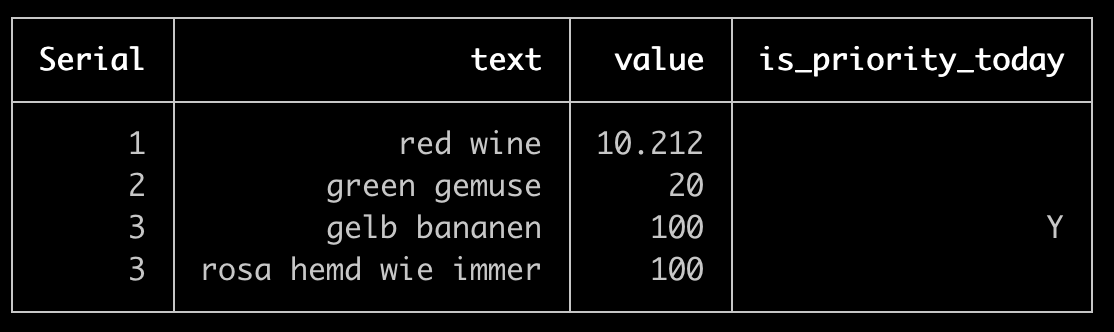
p.addRow({ Serial: 1, text: "red wine", value: 10.212 }); // Single row at a time
p.addRow({ Serial: 2, text: "green gemuse", value: 20.0 });
p.addRow({
  Serial: 3,
  text: "gelb bananen",
  value: 100,
  is_priority_today: "Y",
});
p.addRow({ Serial: 3, text: "rosa hemd wie immer", value: 100 });
p.printTable();
Batch Row Adding
import { Table } from 'console-table-printer';

const p = new Table();

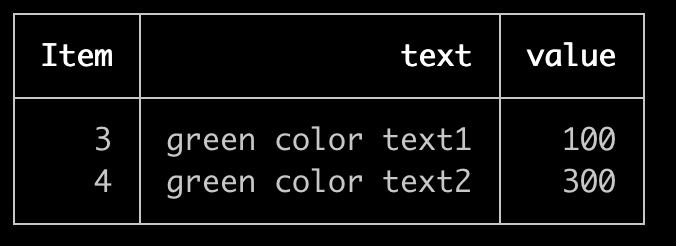
p.addRows([
  // adding multiple rows are possible
  { Item: 3, text: "green color text1", value: 100 },
  { Item: 4, text: "green color text2", value: 300 },
]);
p.printTable();
Chained Row adding
Adding row function can be chained
import { Table } from 'console-table-printer';

const p = new Table();

p.addRow({ Weight: "1kg", text: "red wine", value: 10.212 })
  .addRow({ Weight: "1kg", text: "green gemuse", value: 20.0 })
  .addRow({
    Weight: "2kg",
    text: "gelb bananen",
    value: 100,
    is_priority_today: "Y",
  })
  .addRow({ Weight: 3, text: "rosa hemd wie immer", value: 100 });
p.printTable();
Clearing Rows
Use clearRows() when you want to remove the current row data and reuse the same table instance. The table keeps its columns and configuration, so you can add fresh rows without rebuilding the table.
clearRows() returns the table instance, so it can be used in a method chain.
import { Table } from 'console-table-printer';

const p = new Table(["id", "status"])
  .addRows([
    { id: 1, status: "Queued" },
    { id: 2, status: "Running" },
  ])
  .clearRows()
  .addRows([{ id: 3, status: "Done" }]);

p.printTable();
Rows added during table creation can also be cleared.
import { Table } from 'console-table-printer';

const p = new Table({
  columns: [{ name: "task" }, { name: "state" }],
  rows: [
    { task: "fetch", state: "pending" },
    { task: "build", state: "running" },
  ],
});

p.clearRows().addRow({ task: "deploy", state: "done" });

p.printTable();
After calling clearRows(), rendering the table shows the existing headers with an empty body until new rows are added.