Special Chars and emojis
Special chars
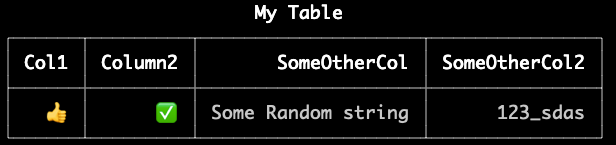
Special chars might have different character lengths in your console. If you want to declare the length of a character yourself, use the charLength option.
import { Table } from 'console-table-printer';
const bundle = new Table({
  title: "My Table",
  charLength: { "👍": 2, "✅": 2 },
});

bundle.addRows([
  {
    Col1: "👍",
    Column2: "✅",
    SomeOtherCol: "Some Random string",
    SomeOtherCol2: "123_sdas",
  },
]);

bundle.printTable();
Newlines in cells
The library properly handles newline characters (\n) in table cells. When a cell contains newlines, the content will be displayed on multiple lines while maintaining the table structure.
const p = new Table({
  title: 'Multiline Text Examples',
  columns: [
    { name: 'col1', title: 'Product', alignment: 'left',  },
    { name: 'col2', title: 'Description', alignment: 'left', minLen: 30 },
    { name: 'col3', title: 'Price', alignment: 'right' }
  ]
});

// Simple multiline
p.addRow({
  col1: 'Laptop',
  col2: 'Line 1\nLine 2',  // Basic multiline
  col3: '$999.99'
});

// Product description with features
p.addRow({
  col1: 'Smartphone',
  col2: '- 6.7" Display\n- 256GB Storage\n- 5G Ready',  // Bullet points
  col3: '$799.99'
});

// Long text wrapping
p.addRow({
  col1: 'Headphones',
  col2: 'Wireless noise cancelling\nBluetooth 5.0\n40h battery life',
  col3: '$249.99'
});

// Technical specifications
p.addRow({
  col1: 'Camera',
  col2: 'Resolution: 48MP\nZoom: 10x Optical\nISO: 100-6400',
  col3: '$1,299.99'
});

// Product warning
p.addRow({
  col1: 'Battery Pack',
  col2: 'WARNING:\nDo not expose to heat\nKeep away from water',
  col3: '$79.99'
});

p.printTable();
This will produce a table with multiline content in various formats:
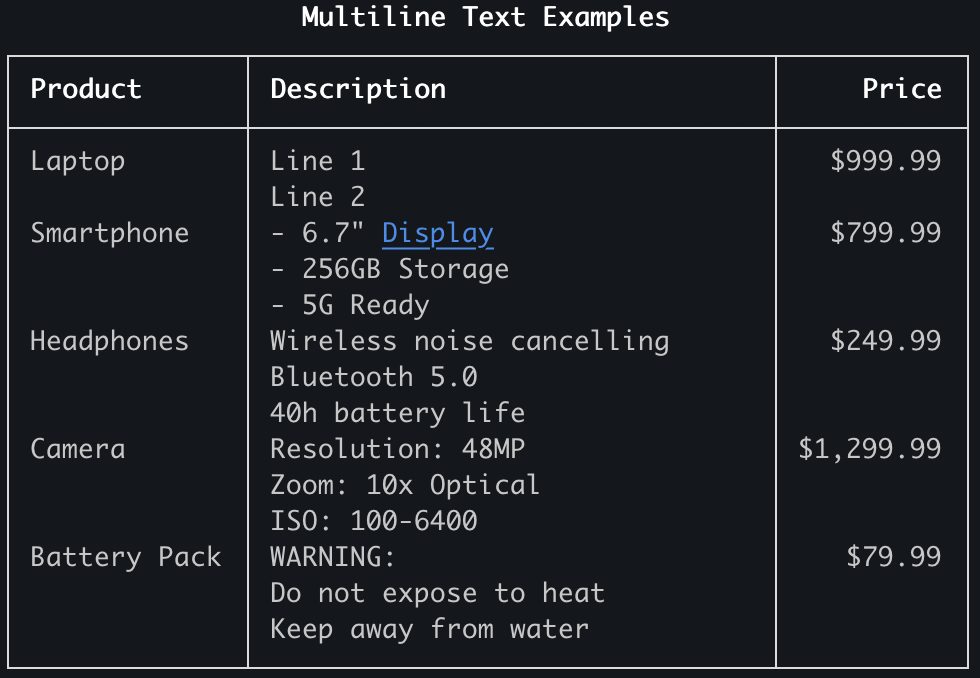
You can use this feature to:
- Display multi-line text in a structured way
- Show formatted content with line breaks
- Present hierarchical or grouped information
- Format long text content to fit within column width constraints